Radio Components
A technical look at what's inside the box. Understanding the components helps you choose the right device and configure it well — but you don't need to know all this to get started. See the Radios page for purchase guidance.
How will you use your radio?
Are you likely to go hiking, biking or driving with your radio, or will it sit in your office connected to a computer & a roof-top antenna?
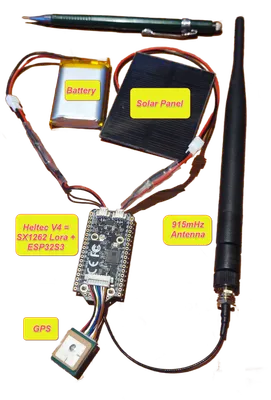
Mobile radios may be more likely to need a battery, GPS, rugged shell and smaller antenna, while stationary radios can rely on a constant power source and perhaps a bigger antenna, even one permanently mounted up high.
Inside the Radio
Under the covers, most radios are just an Arduino or Raspberry Pi device plus a LoRa radio chip with an antenna!
If you want bells and whistles you might also add a GPS, solar panel, and battery. Add a lightning arrestor for permanently mounted antennas. Telemetry sensors (temperature, humidity, etc.) may be useful for some use cases, but the current MeshCore ignores temperature readings for radios and GPS units on repeaters.
You will often find a dozen variants of the same basic radio. Many major manufacturers use the same electronics inside, but repackage them with different cases, antennas, screens, and keyboards for various uses.
Screen & Keyboard
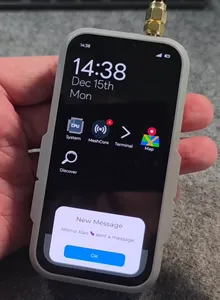
Whether it fits in your pocket or not, also consider how you want to type and read your text messages. Do you want a full keyboard and screen, or are you happy to use your smartphone as the user interface? Do you want a rugged device with no screen that you can just toss in your backpack and forget about until you need it?
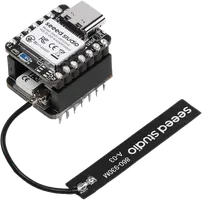
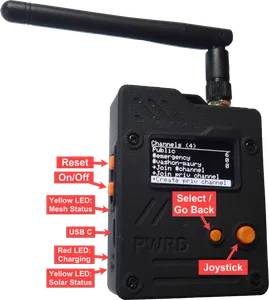
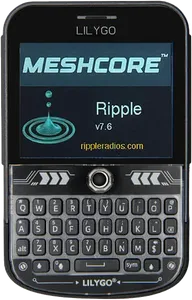
Four varieties of complete, equally capable LoRa radios, with different user interfaces: none, basic, keypad, and touchscreen!
Most radios use a smartphone (or laptop) app to compose, send and read their text messages or sensor data. You may decide that you'd rather not rely on your smartphone or laptop. If so there are a number of options to consider.
For most companion radios a smartphone app (connected via Bluetooth, USB, or Wi-Fi) offers the best user interface — a fantastic display, built-in keyboard, GPS, and familiar experience. Either Lilygo model (both on the right) may be friendly enough to leave your smartphone at home.
What's a Companion Radio? Unless your radio has a full keyboard or touchscreen interface, it probably means you need to use your radio with a smartphone or laptop. If so, it is not a complete standalone device, but a 'companion radio'. They both use the same electronics — the word companion just refers to needing another device for the user interface.
Microcontroller Chip
Under the covers, most radios are Arduino or Raspberry Pi devices connected to a LoRa radio chip with antenna, running firmware to get everything to talk to each other.
The predominant microcontroller chips used in these radios are from the ESP32, Nordic nRF52, STM32, and RP2040 families.
The Nordic is reputed to be the winner over the ESP32 for low power use, but the ESP32 is more popular and has built-in Wi-Fi and Bluetooth. The STM32 family has a huge range of options, from ultra-low-power to high-performance. The RP2040 is a newer option with good performance and low cost, but it lacks built-in wireless capabilities.
| ESP32 | STM32 | nRF52 | RP2040 | |
|---|---|---|---|---|
| Manufacturer | Espressif | STMicroelectronics | Nordic Semiconductor | Raspberry Pi |
| Power Use | Moderate — deep-sleep available, but Wi-Fi/BT subsystem is power-hungry | Excellent range — STM32L ultra-low-power to STM32H high-performance | Ultra-low — optimized to minimize current while running Bluetooth LE | Moderate — no built-in ultra-low-power modes; no internal flash (needs external chip) |
| Models | Many (rapidly expanding line) | Hundreds (F1, F4, G0, L4, H7…) | Several (focused BLE family) | Few (newer, limited variants) |
| Wireless | Wi-Fi + Bluetooth built-in ✅ | Mostly no — usually needs external module | Bluetooth LE (highly optimized) ✅ | None — needs external module |
| Dev Environment | Arduino-compatible; Espressif IDF. Beginner-friendly, large ecosystem | STM32CubeIDE + CubeMX + HAL. Professional-grade, steeper learning curve | Nordic SDK / Zephyr RTOS. Professional-grade, good BLE libraries | MicroPython, C/C++ SDK, Arduino-compatible. Beginner-friendly, huge hobbyist community |
| Cost | Very low (~$2–5) | Moderate | Moderate (premium over ESP32) | Very low (<$1 in volume) |
| Best For | Wi-Fi/BT connected devices, IoT, prototyping | Wired industrial/commercial products, scalable designs | Wearables, fitness trackers, sensors needing months of battery life | Cost-sensitive wired embedded projects, maker/hobbyist use |
Source: ESP32 vs STM32 vs nRF52 vs RP2040 — Predictable Designs (Jan 2026)
LoRa Chip
There is only one brand of chip that handles the LoRa communication: Semtech. Their chips are responsible for sending and receiving messages over the LoRa network, and they determine the range and reliability of your radio communication.
The Semtech SX126x family includes several variants with different features and performance characteristics (e.g., SX1302), but the SX1262 is what almost everyone uses.
However a new chip, the LR2021, will likely start to replace the SX1262 later in 2026.
Firmware / Operating System
Radios run firmware that defines their personality — how they interact with you, connect to the app, and handle LoRa communication. Popular options include:
- Meshtastic — the most widely deployed; great for small peer groups and rural use
- MeshCore — optimized for community networks with dedicated repeaters
- MeshOS ↗ — MeshCore variant for all-in-one devices like the T-Deck
- Ripple / Ultra ↗ — focused on off-grid communications
- Whisper ↗ — lightweight, privacy-focused
- MeshCore Open (open source) ↗
Almost all devices that can run Meshtastic can also run MeshCore — you just flash different firmware onto the same hardware.