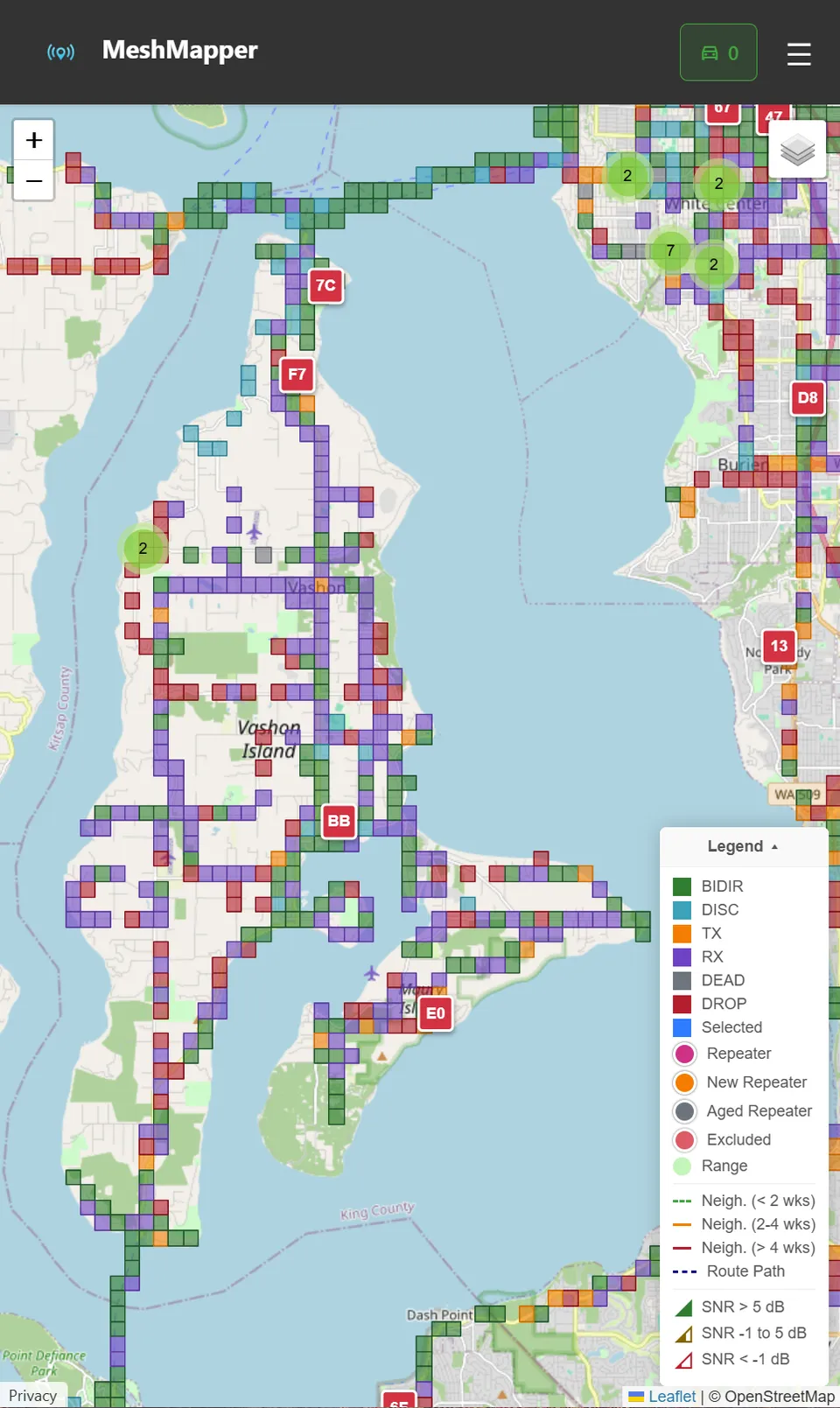
- with just a car-top antenna.
(click for a current map)
Welcome to the Mesh
A LoRa mesh radio lets you send and receive text messages "anywhere" (actually, not yet!) on Vashon Island — completely off-grid, no cell towers, no internet, no monthly fees. You can be on the mesh in an afternoon.
What you'll be able to do
- 💬 Chat off-grid — send messages to anyone on the mesh, no internet or cell service needed
- 📍 Track your location — optionally share GPS position with your group (if your device has GPS)
- 🔒 Private channels — create encrypted group chats or direct messages
- 🌐 Long range — LoRa reaches miles and can bounce through repeaters in parts of the Pacific Northwest
- 🛠️ Tinker forever — solar repeaters, weather sensors, dog trackers, emergency comms... the rabbit hole is deep!
Your 5-step journey
Here's the big picture before you dive in. Each step has its own dedicated page with full details.
Get a Radio
Pick hardware that fits your lifestyle — pocket carry, all-in-one handheld with keyboard, or hardware suitable for a future rooftop repeater. We cover the most popular choices and what makes each one great.
Popular: LilyGo T-Display P4, Heltec V4, Seeed Tracker, RAK4631 →
Flash the Firmware
Most devices ship with Meshtastic firmware. Loading MeshCore takes about 2 minutes in any browser — no software to install, no command line, completely reversible. You will choose interface and role as separate options.
Uses flasher.meshcore.dev — point, click, done →
First-Time Setup
Configure your selected interface: MeshCore app for Community BLE/USB/WiFi, or on-device setup for MeshOS/Ripple. Then set your region and node name. Takes about 5 minutes.
Android · iOS · Web app at app.meshcore.nz →
Using MeshCore
Join the public channel, send your first message, and see who hears you. Explore direct messages, private channels, and watch your radio show repeater replies in real time.
"Heard by 3 repeaters" — your first mesh moment →
✨ Bonus: Mapping & Range
Optional but fun — see your coverage on a live map, find dead spots, and learn how repeaters extend your reach. War-drive the island and contribute your data back to the community.
Live map at PNW.MeshMapper.net →
MeshCore or Meshtastic?
Both run on the same hardware. The choice depends on how you'll use it:
| Use case | Best choice |
|---|---|
| Community mesh network on Vashon / Puget Sound — urban & suburban areas | MeshCore ✓ |
| Mountain hiking, backcountry, small friend group | Meshtastic ✓ |
| IoT sensors, fleet tracking, data collection | LoRaWAN |
Good news: you can switch at any time by re-flashing. Many people run both MeshCore and Meshtastic on different devices.
What hobbyists go on to explore
Once you've got a radio on the mesh, a whole world opens up. You don't need to do any of this — but it's fun to know it exists:
- ⚡ Solar repeater on your roof — runs forever on a small panel, extends coverage for the whole island
- 🗺️ Mesh mapping — log your walks & drives to build coverage maps
- 🌡️ Sensor nodes — temperature, humidity, air quality beacons over LoRa
- 🐕 Pet / asset trackers — attach a GPS node to a collar or vehicle
- 🚨 Emergency comms — mesh networks are resilient when cell towers go down
- 🔭 Satellite integration — some folks tie in APRS, packet radio, or even Reticulum
Ready? Head to Step 1: Get a Radio to pick your first device.